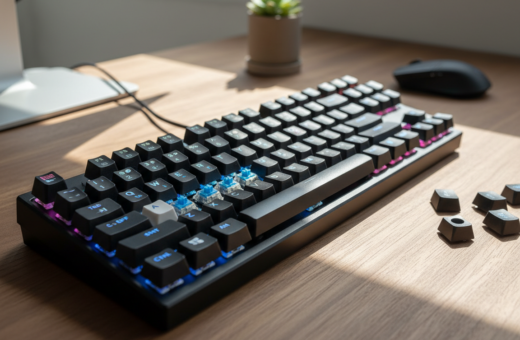
Upgrading a mechanical keyboard often means hunting for costly parts. Yet a simple change inside the keyboard can yield a bigger impact. Lubing switches smooths motion, trims harsh tones, and raises overall performance without swapping components.
Kevin Hofer, Senior Editor at digitec, notes that properly lubed parts completely end the scratchy feel and high-pitched ping that plague many builds. For many enthusiasts, that buttery response is more noticeable than a new case or PCB.
Applying the right lube and careful lubrication alters the sound profile and enhances the tactile feel. The result is a consistent, premium experience that keeps everyday typing responsive and satisfying.
This guide shows how simple attention to internal parts can deliver a high-end sound and performance boost, proving the difference often lies beneath the keycaps.
Why Lubing Switches Makes a Bigger Difference Than Expensive Parts
A careful internal tweak can change how a mechanical keyboard feels more than a pricier case or PCB. Manual attention to each component delivers a tangible boost in sound and feel that many upgrades cannot match.
Factory pre-lubed options are growing, but many users and enthusiasts still prefer hands-on work. The act of lubing is a deliberate application that targets friction points and refines the travel of every switch.
- Consistency: Manual care ensures each switch meets personal standards for smoothness.
- Control: The process lets builders adjust feel and sound for a premium experience.
- Value: Investing the time to lube often outperforms expensive hardware swaps in real-world performance.
Doing the work yourself fixes the hit-or-miss nature of factory application and turns a stock keyboard into a refined tool. With patience and the right method, the result is a more uniform feel across keys and a better overall experience.
Understanding the Impact of Lubed Switches Quieter Typing
A modest change inside each key can transform how a board sounds and feels.
Smoothness and reduced metallic noise are the two main wins when one applies careful lubrication to keyboard mechanisms. By treating the internal contact points, the scratchy feel and thin metallic profile fade. That makes long sessions more pleasant in shared rooms.
Smoother Keystrokes and Less Scratchiness
Linear switches show the greatest gain because any friction is immediately noticeable. Proper lubrication removes scratch and harsh clicks without dulling the key’s purpose.
Improved Consistency Across Keys
Uniform lubrication means each key delivers the same feel and sound. Cherry Red Silent models already run near 45 dB, and careful work can match or improve perceived noise levels.
- Reduced noise: makes shared spaces calmer for users and coworkers.
- Tactile preservation: the tactile bump stays crisp if lubricant avoids the stem legs.
- Sound tuning: pairing PBT keycaps with lubrication refines the overall sound profile.
“A consistent approach to lubrication often produces the biggest audible and tactile difference in a keyboard.”
For a deeper primer on techniques and results, see the switch lubing impact guide.
Essential Tools for a Professional Switch Modification
Successful switch modification starts with a kit of reliable tools and a clear method. Proper gear reduces mistakes and speeds the process.
Core items include a quality switch opener and a trusted lubricant. The KFA Switch Opener from KeebsForAll is a solid choice for safely separating housings. Krytox 205g0 remains a top pick for a consistent, long-lasting lube.
- Safe disassembly: a switch opener lets users split top and bottom housings to access the stem and springs.
- Controlled application: apply a thin coat of lube to rails and stem legs to avoid a mushy feel; mind the amount.
- Workspace: a dedicated lube station saves time and keeps linear switches and clicky switches organized during the process.
“Manual modification with the correct tools delivers superior results compared to factory application.”
Preparing Your Mechanical Keyboard for Lubrication
Before any lubricant touches a switch, a clear, safe workspace sets the stage for good results.
Start by unplugging the keyboard to avoid electrical issues while handling hot-swappable sockets. For hot-swap models, removal is quick and avoids soldering, which helps beginners work confidently.
Safety Precautions for Hot Swappable Boards
Use a keycap puller to remove keycaps and keep them organized by row. This makes reassembly simple and prevents lost keys.
- Organize parts: place top housing and stem in a tray when opening a switch so small pieces stay put.
- Clean tools: ensure pliers, openers, and brushes are free of debris to protect the housing and stem.
- Light application: apply a thin coat of lube to rails and the stem to cut friction and reduce noise in keystrokes.
Treat springs with a small amount of lubricant to remove metallic ping. Taking these steps guarantees a more consistent feel across every key and improves the overall keyboard experience.
Step by Step Guide to Applying Switch Lubricant
A clear routine and steady hands are the quickest route to better feel and sound in a mechanical keyboard. Prepare tools: a switch opener, a fine brush, trays for small parts, and your chosen lubricant. Work in small batches to keep parts organized and consistent.
Lubing the Stem
Use the switch opener to separate the top housing from the bottom housing. With a fine brush, apply a very thin coat of lube to the four outer walls and the center pole of the stem. Avoid the stem legs where a heavy coat can dull the actuation.
Applying Lubricant to Housing Rails
Lightly coat the rails inside the top housing. Be careful to steer clear of the metal contact leaf to prevent actuation issues. A thin, even application preserves smoothness without making the switch sluggish.
Managing Spring Ping
To tame spring ping, apply a tiny amount of lubricant to each coil or use bag-lubing for even coverage. Reassemble the top housing and test each switch by pressing it several times to distribute the lube across internal parts.
- Tools: switch opener and fine brush are essential.
- Method: work slowly and use minimal application per component.
- Results: enthusiasts report more consistent performance and reduced noise after this process.
“Careful application and modest amounts of lube produce the best, most repeatable improvements.”
Customizing Your Acoustic Profile Through Advanced Techniques
Advanced acoustic tweaks let users move beyond stock sound and build a personal audio fingerprint for their board.
Material and layout choices matter. The Redragon K719 uses a gasket-mounted build with five-layer damping to produce a deep, creamy profile. The Redragon OTIIM K729 PRO pairs a damp case with Silent Peach custom switches for an ultra-quiet result.
Modders often add foam, alter plate mounts, or swap springs to tune resonance. For the best outcome, they balance physical dampening with careful lubing of the stem and housing rails.
- Adjust the amount of lubricant to shift tone; a heavier coat mutes higher harmonics.
- Use different lube types for linear versus tactile switches to keep the tactile bump intact while gaining smoothness.
- Keep lubricant off the contact leaf to avoid missed clicks or actuation trouble.
Combine these methods with a quality keyboard and controlled application to craft a unique sound profile. For more on reducing overall board noise, see reducing mechanical keyboard noise.
“Thoughtful material choices and precise lube application yield the most refined acoustic results.”
Conclusion
A small, deliberate maintenance step can reshape how a mechanical keyboard performs and sounds.
Careful lubing and the right lubricant applied with proper tools and method yield clear results. The process improves feel, trims metallic noise, and evens out the profile across keys and housing. Linear switches and springs both benefit when a thin coat reaches the stem and rails.
Enthusiasts who invest the time report a premium experience that rivals factory and custom options. Whether one chooses to do the work or buy factory-lubed parts, the difference in performance is obvious. Less is more: a light application produces the best balance of smoothness and tactile response.
Follow a steady process, use quality tools, and enjoy better keystrokes, sound, and long-term performance.