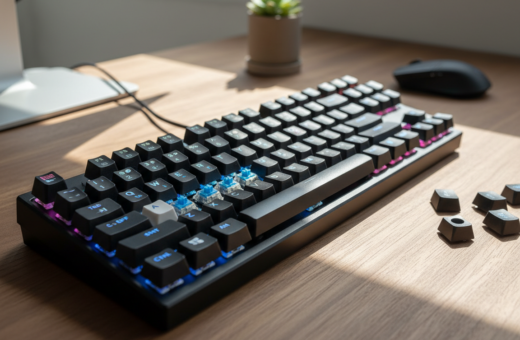
Late-night productivity depends on tools that let a person focus without disturbing others. In a United States home office, a silent mechanical keyboard can make a big difference. Tests show an average sound level of 20.3 dB, notably lower than common rubber dome models.
By choosing the right switches, case materials, and dampening methods, someone can build a typing experience that cuts unwanted noise. The guide that follows explains options for refining mechanical keyboards so late work time stays calm and productive.
Key benefits: better focus in shared spaces, improved feel while typing, and a premium experience without loud clatter. This introduction sets the stage for practical, tested tips to craft an effective home office solution.
Understanding Mechanical Keyboard Noise
The sources of sound in a desk rig are simple but easy to overlook. Identifying where impact and rattle originate helps a user target fixes and improve the overall typing experience.
Switch Mechanics
Each individual switch contains a spring and a stem that completes the circuit when pressed. That action creates the tactile and audible response users feel and hear with each key.
Design matters: the stem profile, spring weight, and housing shape shape the sound signature of a mechanical keyboard. By studying how a switch moves, one can predict where impact and resonance occur.
Stabilizer Rattle
Stabilizers sit under larger keys to ensure even travel. They also introduce common rattles when parts move against plastic mounts.
Addressing stabilizers is a key step in any silent mechanical approach. Simple fixes—lubing posts, clipping stems, or swapping parts—often cut the worst noise without changing the typing feel.
- Know the switch internals to reduce impact sound.
- Inspect stabilizers to find rattle points.
- Combine tweaks for a quieter typing experience.
For a deeper walkthrough on building a silent mechanical keyboard, see the silent mechanical keyboard guide.
Selecting the Right Silent Switches
Picking the right switches sets the tone for how a board sounds and feels during late-night work. This choice shapes the typing feel, the level of impact, and how the board blends into an office or home environment.
Linear Options
The recommended linear choices deliver smooth travel with minimal thud. Candidates include the Silent Peach V2, Silent Ocean, and Silent White.
These tend to sound lower and offer a consistent feel across the layout. They pair well with dense case materials and thicker keycaps for added silence.
Tactile Options
For users who want feedback without loud click, the Silent Cream Yellow Pro (V3) and Silent Jade Yellow are solid picks.
They provide a snappy bump and still reduce noise compared with many stock switches.
Sample Packs
Testing before you buy makes sense. The INEDA Digital Store on AliExpress offers sample packs of Outemu silent switches so they can try different types without committing to a full set.
“Trying a few switches is the best way to find the right feel for your use.”
- Tip: Start with a mixed sample, then commit to a full set that matches your stabilizers and keycaps.
- Silent switches often outperform stock options in shared spaces, improving focus and silence.
Evaluating Case Materials for Sound Reduction
Case choice has a major effect on how a build sounds. Material, mass, and internal space shape resonance and impact response. Aluminum cases are commonly favored because their density helps absorb vibration and tame per‑stroke energy.
The GMK87 is a budget-friendly option many recommend for its pleasing sound profile. The Keychron Q-series earns praise for weight and solid construction, which reduce ringing and improve sustain.
Avoid FR4 plates when the goal is to lower noise; FR4 often increases brightness and resonance. When choosing a case, check whether a volume knob or other features cut into the cavity. A knob can limit space for dampening materials and change internal acoustics.
- Consider weight: heavier cases often mute harsh frequencies.
- Dampening matters: foam, silicone, or gasket mounts work better when the case supports them.
- Match components: switches and keycaps should complement the case for balanced tone.
“By picking a case that supports internal dampening, builders can greatly improve the overall acoustic performance.”
The Role of Stabilizers in Your Quiet Mechanical Keyboard Setup
Addressing stabilizers first delivers the biggest return when cutting down on unwanted per‑key noise. Stabilizers are often the main source of rattle in a mechanical keyboard, especially under larger keys like Space and Enter.
Proper maintenance matters. Builders commonly lube stabilizers with Krytox 205g0 to remove scratchy contact and smooth travel. This step reduces impact and keeps others from being disturbed during late work.
A thoughtful layout can cut reliance on large keys. Fewer big caps means fewer stabilizers to tune. Designers often prefer compact layouts to improve tone and consistency across keys.
Test each stabilizer individually after lubing and clipping. Consistent feel across the board gives a more professional typing experience suitable for both office and home use.
- Choose quality stabilizers — design affects sound and performance.
- Combine lubing with clipping or banding to remove rattle.
- Verify stabilizer performance with the intended switches and keycaps.
“A refined set of stabilizers transforms a noisy board into a smooth, reliable work tool.”
Implementing Internal Dampening Techniques
Adding internal padding transforms the inner cavity into an acoustic buffer that tames lively resonance. Builders often place foam between the backplate and PCB to reduce hollow echoes and sharpen tone.
Foam and Padding
Materials like Poron foam work well because they absorb vibration without compressing under key travel. Even common shelf liner can fill empty space and lower unwanted ringing.
Careful placement matters. Foam should not press against stabilizers or the PCB trace areas, as that can change feel or cause interference.
- Implementing internal dampening refines the sound of a silent mechanical keyboard and removes hollow echoes.
- High-quality foam inside the case absorbs vibrations more effectively than relying on switches alone.
- When installed thoughtfully, dampening makes the keyboard sound muted and pleasant rather than bright or sharp.
“By layering foam strategically, builders create a denser tone and a more premium feel.”
Choosing the Best Keycaps for Silence
Keycaps act as the final acoustic layer between a switch and the room. They influence tone, feel, and how much noise reaches others during late-night typing.
XDA profile keycaps are popular in silent builds because their uniform shape gives a consistent feel across all keys. That uniformity helps when someone wants creative layouts without row-specific caps.
The material and thickness of caps change sound. Thicker PBT or ABS sets often produce a deeper, less bright tone. They also add a bit of mass that helps mute impact.
Rubber O-rings installed under caps add an extra layer of damping. They reduce final travel noise but can slightly alter the original feel of the switches during typing. Users should test rings on a few keys before committing to a full set.
- Tip: Match keycap material to the chosen switches for balanced tone.
- Try different profiles and O-rings to find the preferred balance of feel and silence.
- Small swaps can yield noticeable reductions in noise without changing playability.
“Keycaps complete the acoustic chain; choosing them thoughtfully refines both tone and feel.”
Benefits of Ortholinear Layouts
Ortholinear layouts use a grid that shortens finger travel and helps maintain steady hand placement during long typing sessions.
The layout removes large keys and, as a result, eliminates the need for stabilizers. That change naturally lowers the noise created by big caps and improves overall tone.
The ID75 PCB is a popular choice for builders who want a customizable ortholinear board. It supports flexible layouts and lets users focus on making the switches as silent as possible.
Many users report a more consistent feel and improved accuracy when they adapt to the grid design. The ergonomic hand position also reduces fatigue during intensive work.
- Grid design cuts finger distance and speeds up typing.
- Removing large keys reduces stabilizer-related noise and complexity.
- Consistent key placement improves accuracy and long-session comfort.
- ID75 and similar PCBs make customization straightforward for silent builds.
“Adopting an ortholinear layout is a practical way to simplify a build while improving typing experience.”
Essential Tools for Your Custom Build
A concise tool kit makes assembling a board efficient and safe. A reliable switch puller and a keycap puller are mandatory for hot‑swappable projects. They let a builder remove parts without harming pins or caps.
High‑quality lubricant such as Krytox 205g0 is essential for stabilizers. Proper lubing transforms a stock feel into a near‑professional result and reduces post‑assembly tinkering.
- Switch puller: removes switches fast from hot‑swap PCBs.
- Keycap puller: prevents chips and keeps keycaps reusable.
- Lubricant: Krytox 205g0 for smooth stabilizers and reduced rattle.
- Basic hand tools: small screwdrivers, tweezers, and floss for dampening placement.
- Budget option: the TES68 kit provides a complete, affordable path for a silent switches build without high cost.
Using proper tools protects the PCB and parts during assembly. It also shortens the time spent adjusting switch orientation or trimming stabilizer stems. For those aiming for a refined sound, tools are not optional — they are part of the process.
Assembling Your Silent Board
Putting together a silent build can be quick and rewarding, especially with a hot-swap PCB. Hot-swappable PCBs let a builder push switches straight into the board, so no soldering is required.
Before insertion, check each silent switches’ pins and make sure they are straight. Bent pins can damage hot-swap sockets and cause faults.
Align each switch carefully with the PCB socket. Apply even pressure until the switch clicks into place. Test each key right away to confirm electrical contact.
- Use a hot-swap board to simplify the build and reduce risk for beginners.
- Verify pin alignment for every switch to protect the sockets.
- After installing switches, test each key before adding keycaps.
- Fit keycaps last — this small step makes the build feel complete and satisfying.
A well-assembled board delivers consistent typing and keeps rattle or noise to a minimum. By following these simple steps, anyone can finish a professional-grade silent mechanical keyboard that suits late-night work.
Mapping Keys with Software
VIA and other mapping tools make it simple to tailor a keyboard to a user’s work. The software lets them reshape a layout, assign macros, and move functions without soldering.
VIA accepts a JSON file to quickly apply a custom layout to ortholinear or standard boards. That file transfers layer rules and lighting settings in seconds.
Practical advantages: users can remap keys for shortcuts, place media controls under thumbs, and set per‑app layers. The tool also controls rgb zones for visual feedback.
- Profile switching: save multiple layouts and swap them for different tasks.
- Workflow tuning: place high‑use keys where hands rest to speed typing and reduce travel.
- Easy testing: modify mappings on the fly to find what works best with chosen switches and caps.
“Good mapping unlocks the full potential of a custom board by making every key count.”
Testing and Measuring Sound Levels
Objective measurement confirms whether a build meets the desired level of silence for office or home use. A typical silent mechanical keyboard registers about 20.3 dB, while a stock mechanical model often sits near 30.4 dB. Those numbers make comparisons simple and practical.
Builders often use a decibel‑meter app on a smartphone to capture readings. It provides an easy way to compare different switches and case dampening options in the actual room where the board will be used.
Testing each key matters as much as overall dB. Try typing passages and single‑key strikes to feel whether foam or stabilizers changed the board’s response.
- Measure: record quiet and full typing samples to compare builds.
- Confirm: check that silent switches and foam deliver the expected reduction versus stock parts.
- Verify extras: test knobs, rgb, and every key so nothing adds noise during late‑night work.
“Use decibel readings plus hands‑on feel to validate a final build.”
Conclusion
A well-tuned project rewards patience with cleaner tone and fewer interruptions after hours. By choosing the right switches, adding targeted dampening, and keeping stabilizers maintained, one gets a more pleasant typing experience for late-night work.
Small mods matter. O‑rings, foam, and a proper lube routine often cut the worst noise for little cost or time. An ortholinear layout or gasket mount can further improve feel and reduce large‑key chatter.
Whether someone builds from parts or buys a pre‑silenced model, the results are clear: a careful approach produces a notably quieter mechanical keyboard and a more productive workspace. For a step‑by‑step reference, see the noise reduction guide.