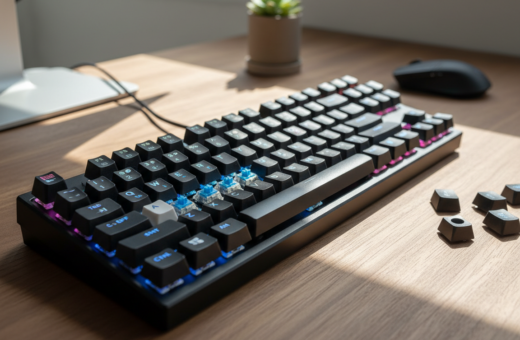
Modern professionals often upgrade their mechanical keyboard to reduce noise and improve the typing experience. The Akko Penguin shows how a sharp “P” tactile bump can deliver a snappy feel while keeping sound low.
Teams that share a desk value a keyboard that balances feedback with calm operation. Silent tactile designs use silicone dampeners and rubber pads to cut harsh clicks and soften each keystroke.
Choosing the right profile and actuation can boost comfort and performance during long work sessions. Many users find that a smooth travel distance and precise tactile switch improve both typing and gaming without distracting others.
For a deeper look at quiet, durable options, consult this silent switches guide. Quiet operation keeps shared spaces productive and helps maintain focus day after day.
Understanding the Need for Silent Switches
A quiet, consistent key action can make long workdays less tiring and more focused. Teams in shared spaces want a balance between satisfying tactile feel and low noise. That demand drives many toward modern silent switches.
The Gateron Zero Degree Silent Linear switch is built with longevity in mind. It rates at 100,000,000 cycles, which means reliable performance during heavy typing and gaming use.
Design differences matter. These switches use specialized internal parts and rubber dampening pads to reduce sharp impact. The result is softer travel and less hand fatigue at the desk.
- Durable actuation keeps feedback consistent over time.
- Rubber pads and dampening cut down on unwanted noise.
- Smooth profile supports both work typing and light gaming sessions.
Choosing the right switch means weighing travel, tactile response, and long-term performance. Quiet key mechanisms help maintain a professional atmosphere while improving the overall keyboard experience.
How Silent Switches for Office Environments Work
Minimizing clack comes down to how the stem, pads, and bottom housing manage energy on impact. Designers blend mechanical profile tweaks and dampening to keep noise low while keeping a crisp feel.
Sound Dampening Mechanisms
Relief cuts on the stem rails are one modern solution. The Wuque WS Silent Tactile switch uses these cuts to reduce harsh contact without relying on silicone dampeners, so the key retains a firm bump and quick return.
Bottom housing pads add another layer of control. Many models include rubber or foam pads that absorb the sound when the stem hits bottom. That combination cuts both the downstroke and the return impact.
Actuation Characteristics
Manufacturers tune actuation force and travel to balance feedback and quiet operation. Gateron and other makers adjust the stem and housing geometry so each switch gives a consistent feel across long sessions.
- Relief-cut stems keep tactility without mush.
- Bottom dampening pads reduce final impact noise.
- Engineered actuation ensures predictable feedback for typing and gaming.
Comparing Top Silent Tactile Switch Models
Different tactile bumps, dampening methods, and housings shape both feel and noise, so a direct comparison is useful.
Tactile Performance
The Akko Penguin delivers a sharp “P” shaped tactile bump and snappy feedback. It uses silicone dampeners on the stem rails to keep impact muted while preserving a crisp actuation.
The Durock Shrimp emphasizes a pronounced bump thanks to a silicone ring around the stem rail. That design yields a distinct tactile hit with a muted “thock” on return.
The TTC Bluish White gives a firmer typing feel through a dustproof stem and a high-hardness dampener in the bottom housing. It suits long typing sessions that need consistent travel and feedback.
Sound Profiles
The Penguin stays bright but quiet, ideal when a quick bump is wanted without loud clicks. The Shrimp trades a bit of sharpness for a warmer thock.
The Bluish White leans toward a solid, less resonant profile thanks to its bottom dampening. The Wuque WS Silent Tactile is notable for using relief cuts to reduce noise without silicone.
Best Use Cases
- Akko Penguin: fast typing and light gaming where a snappy bump is preferred.
- Durock Shrimp: shared desks that value a muted thock and clear tactile feedback.
- TTC Bluish White: professional typing sessions that need durability and a firm feel.
- Wuque WS: users who want low noise without extra silicone dampeners.
Key Design Features to Consider
Small changes in switch geometry and materials can transform typing feel and reduce unwanted noise.
Many modern silent switches use a transparent top housing to highlight RGB while keeping a clear sound profile. A box-style dustproof stem appears in several popular models to cut wobble and stabilize each actuation.
Dampening choice matters. Designers use silicone or rubber dampeners in the bottom housing to absorb impact and tame final travel noise. That engineering defines whether the tactile bump reads sharp or muted.
- Transparent tops improve lighting without changing the feel.
- Box-style stems reduce wobble and aid consistent actuation.
- Bottom dampening controls sound and protects longevity.
For gamers and heavy typists, actuation force and travel set the usable profile. By weighing housing, stem type, and dampening material, users can match a silent tactile switch to their preferred feel and sound.
Benefits of Upgrading Your Typing Experience
A quieter keyset can turn a noisy desk into a focused, productive workspace. Upgrading the core mechanism improves feel, reduces distracting noise, and supports longer, more comfortable typing sessions.
Impact on Productivity
Reduced distraction matters in shared environments. Silent switches cut sharp clacks and help colleagues stay on task.
Comfort gains are clear: many professionals report less hand fatigue and steadier speed after switching to a quality tactile switch. A consistent tactile bump and controlled travel help maintain accuracy.
- Better focus: Lower sound levels minimize interruptions during concentrated work.
- Consistent feedback: A stable stem and tuned actuation preserve typing rhythm.
- Durable performance: Dampeners, silicone or rubber, reduce bottom impact and extend life.
Beyond daily work, these upgrades suit light gaming and heavy typing alike. Investing in a high-quality silent tactile or tactile switch improves the overall experience and supports sustained performance.
Alternative Methods for Sound Dampening
Simple desk additions and small mods can cut keyboard sound without rebuilding the entire setup.
Placing a deskmat under a mechanical keyboard absorbs impact and reduces echo across the desk. It also cushions the keys and makes long sessions more comfortable.
Lubing stabilizers and switches on the PCB can dramatically lower noise and smooth travel. They must be applied carefully to avoid a mushy feel and to preserve the original bump and feedback.
Installing rubber O-rings on keycaps limits bottoming out and softens final impact. These dampeners change travel distance slightly, so trying different thicknesses helps find the right feel.
- Deskmat: easy, cost-effective dampening for any desk setup.
- Lubing: reduces rattles in stabilizers and pcb-mounted parts when done precisely.
- Rubber O-rings: quiet the keycap landing and protect the stem from harsh impact.
- Combine methods: using a mat, lubed stabilizers, and O-rings often yields the best noise control.
Regular maintenance—cleaning keycaps and checking stabilizer clips—keeps a keyboard performing quietly. These alternatives let users tailor sound and feel for both gaming and professional desk work.
Selecting the Right Switch for Your Workflow
A considered pick blends actuation force, travel distance, and brand reliability to suit specific workflows.
Start by matching actuation and travel to your typing speed and goals. A lighter actuation suits fast typing, while a firmer profile aids accuracy during long sessions.
Brand matters. Gateron and similar makers produce reliable options tuned for professional use. Choose a model with consistent actuation and durable housing to avoid surprises.
Feel and feedback are personal. Many prefer silent tactile models because they balance quiet operation with a clear tactile bump. Others opt for a smooth linear switch when gaming or if they want uninterrupted key travel.
- Check stem and housing compatibility with your keyboard and keycaps.
- Verify PCB fit and stabilizers if building a custom board.
- Consider dampening at the bottom to shape final sound and feel.
Installation and Compatibility Considerations
Installing new key gear starts with checking physical fit and the board’s pin layout. Simple prep avoids bent pins and mismatched parts that harm actuation and feel.
PCB Compatibility
Verify the pcb supports the switch pin configuration and plate style before you press anything in. Many hot-swappable keyboards accept common two- or three-pin mechanical switches, but some require specific layouts.
Tip: The Gateron KS-6 Aliaz Silent Tactile features a transparent PC top and bottom housing that works well with RGB-enabled keyboards. Confirm compatibility to keep lighting and performance intact.
Lubrication and Maintenance
Proper lubing of the stem and stabilizers reduces noise and smooths travel. Use the right lubricant and avoid over-application to preserve the tactile bump and actuation.
- Avoid bending pins during installation to keep consistent actuation.
- Check bottom housing and pads when adding dampeners to control impact and sound.
- Clean keycaps and test stabilizers regularly to maintain long-term performance.
Conclusion
The right bump and dampening create a balanced feel that supports sustained focus. A quality tactile switch can improve typing comfort and reduce fatigue during long sessions.
Silent tactile options offer a crisp feedback profile while keeping noise low. Upgrading a mechanical keyboard can lift the overall typing experience and make shared spaces more pleasant.
Users should check PCB compatibility and maintain stabilizers to keep performance steady. Choosing the proper tactile and sound profile ensures a productive, comfortable setup that fits each user’s needs.
Bottom line, investing in refined tactile design and careful setup delivers better accuracy, longevity, and a superior keyboard experience.