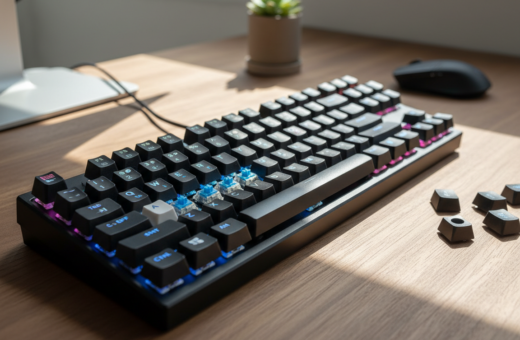
This introduction outlines how sound and feel shape a user’s setup choice. It compares typical reactions to mechanical keyboards and membrane keyboards and explains why sound matters for office and gaming use.
Many people pick a device based on the typing experience. Some prefer the tactile feedback of a mechanical keyboard, while others favor the softer touch of a membrane keyboard.
Sound plays a big role in that decision. Offices often favor quieter models, and gamers may choose louder options for clear feedback during play.
By breaking down construction and output, this guide helps readers decide which model is the right choice for their daily work or gaming sessions. It highlights the key advantages so readers can find the keyboard better suited to their needs.
Understanding the Basics of Keyboard Technology
Identifying the internal switch design is the first step to choosing the right typing tool. Modern keyboards are grouped by how each key registers a press. This classification affects feel, durability, and sound.
One common design uses a flexible layer to close a circuit beneath the keys. Another relies on individual mechanical switches for each key. Both approaches serve different users and budgets.
Manufacturers build products from simple office boards to high-end mechanical keyboards for enthusiasts. Structural differences change how a device responds during long sessions.
“Pick a model that matches your daily tasks and environment.”
Evaluating typing volume, longevity, and intended use helps people make a smart choice. Knowing the underlying technology ensures the selected device meets workflow needs.
Defining the Mechanical Keyboard Experience
High-end designs focus on parts that deliver a repeatable, satisfying press every time. The Keychron Q3 Max QMK/VIA is a prime example of a full metal QMK wireless custom mechanical keyboard with an 80% TKL layout that highlights this build philosophy.
Anatomy of a Switch
Each key uses its own mechanism: a housing, a spring, and a stem work together to complete an electrical circuit when pressed.
This assembly ensures each keystroke registers with high accuracy and consistent timing. The parts are replaceable, which lets users swap springs and keycaps to tune the design.
The Tactile Feedback Factor
Users often prefer the tactile bump that signals a successful actuation. That physical feedback improves typing speed and reduces errors for some people.
Customization is core to the enthusiast scene. By choosing different switch types, gamers and typists can tailor their setup for comfort, sound, and durability.
- Durable parts can last millions of keystrokes.
- Spring compression creates a predictable feel over time.
- Swappable keycaps and switches let users refine performance.
“Pick switches that match your work and play patterns.”
For more on how these designs compare to other options, see this short comparison comparison guide.
How Membrane Keyboards Function
Some popular boards work by letting an elastic rubber pad push a conductive layer into contact when pressed. This simple action completes the electrical circuit and registers the input.
The Rubber Dome Mechanism
The core of many membrane keyboards is a rubber dome that inverts under pressure. When a user presses a key, the rubber pushes a conductive pad down to touch the trace on a flexible sheet, closing the circuit.
This design cushions the press and tends to offer a quieter, softer feel compared with other options. It also keeps production costs low, which makes these keyboards common in offices and budget setups.
- The internal flexible plastic sheet contains conductive traces that register each key press.
- When released, the rubber returns to shape and resets the system without extra parts.
- Simple construction resists dust and spills, improving reliability for daily use.
Overall, membrane keyboards provide a lightweight, affordable option for users who want a muted, comfortable typing experience for routine tasks.
Comparing Membrane vs Mechanical Keyboard Noise
You can hear the difference clearly when a switch strikes its housing versus when rubber cushions the press.
Mechanical keyboards often register louder because many switches create a crisp click or clack. Enthusiasts like that sound and the tactile feedback it signals.
In contrast, membrane keyboards use a rubber dome that mutes impact. That soft feel makes them a preferred option in shared offices and study spaces.
- The primary split in volume comes from physical impact versus cushioning.
- Performance-minded users pick a mechanical keyboard for responsiveness in gaming and fast typing.
- Silent switch variants exist, but they still tend to be louder than standard rubber domes.
Choosing the right board means weighing feel and feedback against how much sound is acceptable in daily use.
“Sound can shape comfort and productivity in shared environments.”
The Role of Switches in Sound Production
Different switch constructions shape the timbre and volume of every press. The part under each key is the primary source of sound in a keyboard. Designers tune travel, spring, and housing to hit a target acoustic profile.
Linear Switch Characteristics
Linear switches offer a smooth travel with no bump. Gamers favor them for consistent actuation and fast double-taps.
They tend to produce a lower, more controlled thud. Paired with soft keycaps, linear choices can keep a mechanical keyboard relatively quiet.
Tactile Switch Profiles
Tactile types add a small bump halfway through the press. That bump gives clear feedback without a loud click.
Many typists like tactile switches for improved accuracy and rhythm. The housing and keycap shape further shape the final sound.
Clicky Switch Acoustics
Clicky switches combine tactile feel with a distinct audible click. Cherry MX click variants are a classic example of a switch that prioritizes sound and feedback.
Users can mix switch types or swap keycaps to tune volume and tone across keyboards.
- Switch design is the biggest factor in sound production.
- Keycap and housing choices modify the acoustic result.
- Choosing linear or clicky options lets users target quiet or bold sound profiles.
“The switch defines how a key sounds and feels during use.”
Durability and Longevity Considerations
A durable build can turn a purchase into a long-term investment. Mechanical keyboards are engineered with robust, individual switches that can endure up to 100 million keystrokes. That longevity makes them a top pick for heavy users and gamers who demand consistent performance.
By contrast, membrane keyboards usually rely on a rubber dome that wears out sooner. Typical life spans are near 5 million keystrokes before elasticity and responsiveness decline.
Repairability favors the mechanical option. Because each key has its own switch, replacing a single failed part is often straightforward. That lowers long-term cost and keeps keyboards in service longer.
Membrane designs can require replacing an entire rubber layer or board if the internal circuit fails. That makes repairs less practical and shortens overall useful life.
- High-quality parts extend lifespan and reliability.
- Switch choice and frame materials affect real-world durability.
- Understanding these differences helps buyers forecast years of daily key presses.
“Investing in a better-built keyboard often pays off through many years of reliable use.”
Performance Differences in Gaming and Typing
Gaming and professional typing put unique demands on how keys register and respond. The right board can change accuracy and reaction time during intense use. This section explains how design choices affect real-world performance.
Key Rollover and Responsiveness
Key rollover defines how many simultaneous presses a device can register. Mechanical keyboards often support N-key rollover, so multiple inputs never collide. That helps gamers perform complex combos and macros reliably.
The speed of switches matters for reaction time. Mechanical switches deliver consistent actuation, which improves timing for fast-paced play and high-speed typing. By contrast, some membrane keyboards require deeper presses and can feel slower to certain users.
- Rollover: Advanced rollover ensures every press is detected during rapid sequences.
- Responsiveness: Consistent switch travel gives predictable input timing.
- Typing: Tactile feedback on a mechanical keyboard helps maintain accuracy over long sessions.
- Gaming: Faster actuation and variety in switch types give competitive players an edge.
“Supporting advanced rollover technology means no missed inputs during the most intense moments.”
Customization Options for Enthusiasts
Customizing a typing setup has become a hobby that blends function with personal style. Builders swap parts to tune feel, sound, and look for gaming and daily work.
Hot-swappable designs like the Mojo68 let users change switches without soldering. That flexibility speeds experiments and reduces barriers to trying new switch types.
The Mojo84 adds wireless support and a gasket mount for a softer, premium feel. Enthusiasts value that design for its refined acoustic response and refined typing experience.
Keycaps, switches, frame materials, and internal foam are all adjustable on many boards. These choices let users craft a unique setup that matches ergonomics and performance goals.
- Hot-swap sockets simplify swaps and shorten upgrade cycles.
- Specialty keycaps create a distinct look and alter key feel.
- Frame and foam mods refine tone and vibration.
While a membrane keyboard is usually used as-sold, custom options make mechanical keyboards a favorite for users who enjoy building and fine-tuning gear.
“Swapping parts turns a simple device into a personalized tool for comfort and competitive play.”
Budget and Value Analysis
Total cost of ownership matters more than the sticker price for heavy users. Casual buyers often buy what fits their budget today. For basic office or home use, many find membrane keyboards to be the most budget-friendly and reliable option.
By contrast, mechanical keyboards carry a higher upfront cost. That premium reflects complex parts and higher-grade materials used to build each switch. Over years of heavy use, that durability can deliver better long-term value.
Deciding which to buy depends on how often a device sees daily use and whether extra performance is necessary. Features such as backlighting or wireless connectivity add cost to both model types.
- Lower cost: membrane keyboards use simple rubber domes and often cost less.
- Longer life: a mechanical keyboard can outlast cheaper models when used heavily.
- Feature trade-offs: extra features raise price but can improve comfort and function.
“For strict budgets, a well-made membrane model gives consistent everyday performance. For heavy users, investing in a quality mechanical model often pays off over time.”
Selecting the Right Keyboard for Your Environment
A desk’s layout and the room’s quiet level should guide any keyboard purchase. Choosing the right model helps balance comfort, sound, and performance for work or play.
Quiet Keyboards for Office Spaces
In shared offices, a quiet membrane keyboard is often the best option. It keeps typing soft and minimizes disturbance for nearby colleagues.
Those who want tactile feedback but work in quiet areas can pick silent switch variants. These preserve feel while reducing sound.
Gaming Setups for Performance
For gaming, mechanical keyboards with linear switches deliver fast, consistent feel and speed. Players should check rollover and responsiveness to avoid missed inputs during intense play.
Key size and layout matter too. Tenkeyless or compact designs free desk space for mouse movement and improve ergonomics.
- Pick quiet options for shared workspaces.
- Choose linear or clicky switches based on desired feedback and speed.
- Consider keycaps and frame design to tune sound and feel.
“The right keyboard balances performance, comfort, and sound control to match a user’s daily use.”
Conclusion
Your ideal device reflects the balance you want between tactile feedback and practical durability. For many users, the decision hinges on daily typing comfort and how long a product lasts under heavy use.
Mechanical options suit those who value customization, fast response, and advanced features such as key rollover. They deliver distinct feedback and robust longevity for long sessions.
Alternatively, a membrane model often keeps things quiet and affordable for routine work. Choosing the better keyboard depends on the user’s priorities for feel, sound, and budget over time.
With this guide, readers can match keys and features to their needs and make an informed choice for their next upgrade.