Keeping a clean desk starts with a plan that values both use and looks. They focus on the table surface first and treat cords as part of the design, not a nuisance.
One practical way is to hide wires with a monitor riser. This simple solution removes clutter from view and makes the desk feel larger.
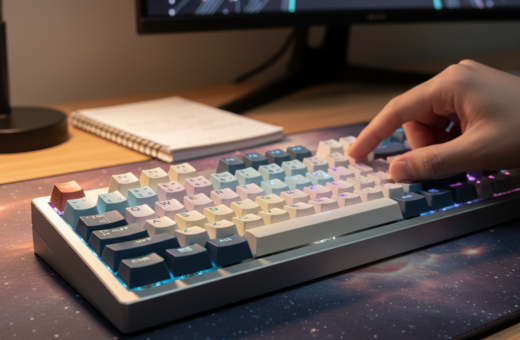
Upgrading a keyboard to a model like the NPKC RO75 PRO lets users change how their cables run. Swapping to neater cables and routing the mouse lead improves the whole setup.
Good management of peripherals saves time each morning. When wires are placed with intent, the workspace stays tidy and ready for work or gaming.
In short: deliberate placement, a few upgrades, and small changes deliver a cleaner desk and fewer tangles.
Understanding the Visual Impact of Desk Clutter
Loose wires draw the eye and break the calm of a well-planned workspace. The primary goal of arranging a desk is to cut visual noise so attention lands on the monitor or keyboard, not on a stray wire.
When cables and peripherals run across the surface, a setup looks accidental rather than intentional. That visual clutter often distracts people and makes daily work feel harder.
Simply hiding cords behind a desk rarely solves the problem. Gravity or movement will pull them free, creating new things to fix later.
- Intentional placement beats invisibility: position keyboard and mouse so cords follow clean lines.
- Small routing changes can lift the whole look of a desk for visitors or clients.
- Professional organizers link a tidy space to better focus and clearer thinking.
Practical tip: prioritize a simple visual hierarchy—monitor, keyboard, then accessories—and route wires to support that order. This approach keeps the desk functional and pleasing without overcomplication.
Essential Tools for Custom Keyboard Cable Management
Choosing the right accessories lets wires stay useful without stealing the room’s focus. This section lists simple tools that make routing and hiding cords fast and repeatable.
Monitor Riser Benefits
A sturdy riser creates a hidden tunnel under the screen. Placing the keyboard lead straight back beneath the riser keeps the surface clean and gives the illusion of a wireless setup.
Wooden risers paired with a braided cable produce a professional look. A riser also improves ergonomics by lifting the monitor to eye level.
Velcro Ties and Fastening
High-quality velcro ties secure mouse and keyboard cables to the rear edge of the desk without scratching. They hold bundles of wires neatly and let users reconfigure the arrangement quickly.
- The NPKC RO75 PRO works well because its detachable USB-C makes routing simpler.
- Keep the keyboard cable flat under the riser to avoid interference with mouse movement.
- Use ties to fasten excess length so cables don’t sag into view.
Tip: For step-by-step methods and more desk tricks, see the desk cable management guide.
Techniques for Hiding Wires on the Desk Surface
A deliberate coil or routed pass can make wires look intentional, not accidental. This section focuses on simple, stylish ways to hide cords while keeping them accessible.
The coiled cable aesthetic turns a plain wire into a design element. Many enthusiasts pair a heavy-duty aviator connector with a braided lead for a vintage, polished look.
Placement matters: lay the coil horizontally along the top edge of the keyboard case for symmetry. Center the coil with the function row to maintain a tidy visual line.
- For a “floating” feel, drill a small hole in the table and feed the wire through; always protect the pass-through with a rubber grommet.
- Route mouse and keyboard exits together to reduce visible wires and keep the desk minimal.
- Small changes deliver a professional result—no expensive gear required.
“The goal is to make every wire look like it belongs.”
For step-by-step ideas and more desk aesthetic tips, see the desk aesthetics guide.
Managing Cables Beneath the Table
Keeping the area under the desk tidy makes cleaning easier and reduces trips over loose wires. A short plan helps users hide most cords while keeping the setup flexible for changes.
Installing Cable Trays
Installing a tray under the desk is the most efficient way to bundle keyboard and mouse cables out of sight. Many users report it takes about 45 minutes to arrange cables neatly using velcro ties.
Routing Along Desk Legs
Route runs down the back leg and secure them with adhesive clips that match the metal color on glass or metal desks. Make sure you leave some length for seat adjustments so the wires never pull tight.
Avoiding Zip Ties for Better Flexibility
Avoid zip ties when possible. They are hard to remove and make future changes slow. Velcro ties offer a reusable solution that keeps the setup tidy for many days.
- Group keyboard and mouse lines so they don’t dangle near feet.
- Use velcro to line up cables for a uniform look.
- Choose clips and trays that match the desk color for a professional finish.
- The NPKC RO75 PRO benefits from neat under-desk routing to keep its presence minimal.
Advanced Customization for a Professional Look
Turning a home setup into a studio-grade desk often means hiding excess runs and choosing pieces that add form and function. A Grovemade shelf or similar shelf hides extra length and creates clean sightlines.
Practical tips: keep total aviator connector runs under 3–4 meters to avoid signal drop on RGB gear. For zero-lag work, a 90-degree plug keeps the connection low-profile at the rear of the table.
The NPKC RO75 PRO supports Bluetooth 5.0 and 2.4Ghz modes, which is the easiest way to remove wires entirely. When a wired link is required, match sleeves to the desk color to camouflage excess and lift coils gently to preserve shape.
- Use sleeves and matched tones to reduce visual contrast.
- Prefer quality components so the keyboard and mouse remain reliable.
- View advanced cable management as purposeful design: every wire should serve an intentional role.
“Advanced setup is less about hiding and more about making every line look planned.”
Final Thoughts on Maintaining a Clean Workspace
A neat desk starts with small, repeatable habits that prevent cords from piling up over time. ,
They should schedule quick checks every few days to spot loose wires and tuck away any stray cables. A short inspection keeps the area ready and reduces time spent redoing the setup later.
For lasting results, pick a central piece—like the NPKC RO75 PRO—as a focus and route the keyboard and mouse leads so they follow clean lines. This approach keeps both function and form aligned.
Good cable management is ongoing but simple. Small changes to routing often make the biggest difference in daily comfort and productivity.