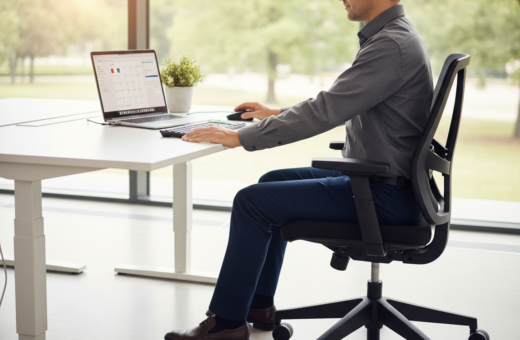
They noticed frequent errors while working in a home office and traced the problem to a standard 29 inches setup. Many people, especially those shorter than six feet, find the standard desk height forces an awkward arm position that leads to wrist and shoulder strain.
By adjusting chair height and the work surface, they eased pressure on their neck and shoulders. Small changes to monitor level and the way feet rest on the floor improved posture and reduced mistyped keys.
Transitioning between sitting standing positions also helped. A standing desk or an adjustable setup that matches a person’s range keeps arms at the correct level and supports steady productivity throughout the day.
In short, aligning body, chair, and monitor is a practical step anyone in the United States can take to prevent long-term strain and boost accuracy at the keyboard.
The Link Between Ergonomics and Typing Accuracy
When body alignment falters, so does accuracy—especially during repetitive computer work. Even small misalignments cause distractions that lead to more mistakes and lower productivity.
Poor posture often results in “text neck” and back pain. This pain draws attention away from tasks and increases the chance of error.
When the monitor sits below eye level, people tend to hunch forward. That forward posture strains the neck and shoulders and disrupts steady work rhythm.
- Keep the monitor aligned with the eye line to reduce neck strain.
- An ergonomic desk setup supports a straight spine and better focus.
- Switching to a standing desk can relieve pain from long periods of sitting.
Research shows the average person (around 5 ft 8 to 5 ft 10) benefits from specific adjustments to desk and chair settings. By aligning the monitor and chair, workers create an environment that reduces fatigue and boosts accuracy.
Strong alignment between equipment and body helps people stay focused, cut mistakes, and protect long‑term health.
Achieving Optimal Desk Height Typing Comfort
Finding the sweet spot for your work surface prevents strain and keeps keystroke accuracy steady through the day. A simple plan of measuring and adjusting creates a setup that supports posture and productivity.
Calculating Your Ideal Range
Measure your full height in inches while wearing shoes. Use that number to estimate a practical range for the work surface and chair relationship.
An adjustable desk makes it easy to fine-tune the surface to individual needs. For an instant check, try the desk height calculator to find a starting range.
The Importance of Elbow Angles
Aim for a 90–110 degree elbow angle so forearms can rest flat on the surface. This angle reduces tension in arms and shoulders and helps maintain steady speed.
- Keep shoulders relaxed and upper arms close to the body.
- Adjust chair and monitor so posture stays upright across the work day.
- Consider a standing option to vary positions and lower fatigue.
Small, measured changes deliver long-term benefits for health and accuracy.
Mastering Chair Adjustments for Better Posture
A correctly set seat transforms posture, reduces strain, and supports steady work during long sessions. This is the point where chair adjustments make the biggest difference in daily wellbeing and performance.
Aligning Thighs and Feet with the Floor
Aim for a chair height in the 16.5–18 inch range so thighs lie parallel to the floor and feet sit flat. This position helps form a 90–110 degree angle at the knee and supports healthy circulation.
If the work surface is too high, people often feel back pain and strain in their arms and forearms from reaching up. In a proper sitting desk setup, the elbows should rest near a 90-degree angle to avoid muscle fatigue.
- Keep feet flat to lower pressure on legs and steady the pelvis.
- Maintain a neutral spine; this prevents forward leaning that negates chair adjustments.
- Check the monitor so they do not lean forward; correct monitor placement preserves the gains from a good chair position.
Small, deliberate changes to chair settings create a range that reduces strain and protects the back over time.
The Role of Monitor Positioning in Reducing Strain
Positioning the screen correctly keeps the head neutral and cuts neck strain over a long work day.
Set the top third of the screen at eye level. For many users this means placing the monitor so the top third sits about 46.5–48 inches from the floor. That placement helps the eyes land naturally and supports an upright posture.
When they are sitting standing at an adjustable surface, people should realign the screen so their eyes meet the top third of the display. Failing to do this leads to forward tilt and persistent neck strain.
An ergonomic desk setup often adds a monitor stand or arm. A good arm lets them tweak the screen angle and level quickly. This flexibility reduces eye fatigue and keeps posture steady across the day.
- Match chair and desk settings with the monitor for a harmonic setup.
- Use a standing desk but keep the screen at the same relative level.
- Invest in a quality monitor arm to adjust angle and reach.
Evaluating the Benefits of Adjustable Workstations
Modern adjustable workstations solve a common problem: one size rarely fits everyone.
Adjustable standing desks that offer a 35–47 inch range let teams match the surface to their bodies. This range supports different statures and keeps the monitor and chair aligned.
Supporting Diverse Body Types
These units benefit people of varying heights and builds. Offices can set one surface for a tall employee and then shift it for a shorter colleague.
- Equal access: adjustable desks support varied body shapes without extra furniture.
- Reduced strain: correct monitor and chair alignment protects neck and back.
- Better posture: feet and knees remain stable when the surface fits the user.
Transitioning Between Sitting and Standing
Moving between sitting standing positions boosts circulation and lowers fatigue. Brief standing periods break long stretches of sitting and help sustain productivity.
Flexibility for Shared Office Spaces
Adjustable desks work well in shared offices. Teams can quickly swap settings so each person finds their ideal range.
- Supports hot-desking without pain.
- Maintains consistent work quality across users.
- Encourages healthy habits and long-term health benefits.
Managing Physical Health During the Workday
Small, regular movement breaks can stop aches from building during a long work day. They should stretch the neck, shoulders, and back every 30 minutes to prevent stiffness and keep productivity steady.
When people alternate sitting standing sessions, start slowly. New users should stand 30–60 minutes daily at first, then add time as the body adapts.
Keep feet flat on the floor and forearms at a roughly 90-degree angle while working. That angle reduces strain in the arms and shoulders and helps keep wrists neutral.
- Use a chair height that lets legs form a 90–110 degree angle to lower back and leg pain.
- Aim the top third of the screen at eye level to protect the neck and reduce eye strain.
- Consider a footrest if the work surface or seat cannot be adjusted exactly.
Pay attention to how the arms and forearms feel. Small shifts in position or a short walk every half hour often prevent the chronic strain that reduces performance and causes pain.
Conclusion
Small, targeted changes to a workstation can yield big gains in accuracy and long‑term wellbeing.
Optimizing the desk height and chair settings is the most effective way to reduce strain and mistakes. They should prioritize proper monitor placement and a stable elbow angle to keep posture steady.
Investing in adjustable desks and sharing standing options gives the body flexibility across the day. Standard setups are not one size fits all, so users should tune their own setup to match their build.
Make a few intentional adjustments today. The result is fewer errors, better productivity, and less pain over time.